
Ask
Bring the real question — get Scripture you can open
Ask is for the question you are carrying on a Tuesday: a decision, a strained relationship, something you can’t quite put into words. Lumin gives you a short answer, the Scripture behind it, and one next step. The verses are right there, so you can read them for yourself. Free to start on iPhone and iPad and on the web.
Free to start · iPhone and iPad · No ads
Want the bigger picture first — what Bible AI is and how to judge one? Read the Bible AI guide →
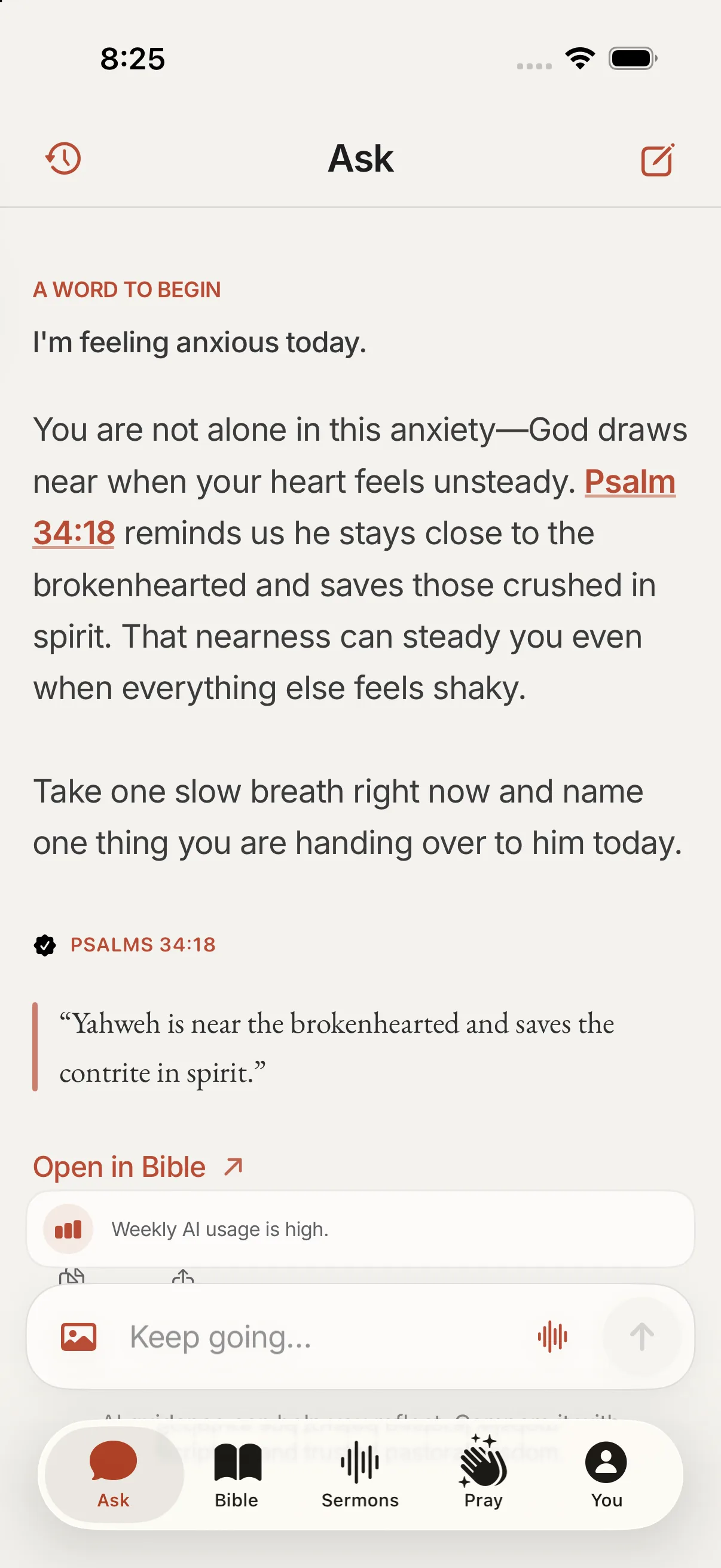
Inside the app
Ask, on your phone.
Bring the real question. A short answer grounded in Scripture you can open.
A current Ask screen: a real question, a named passage, and room to compare with the text.
When words are hard
What Ask is for
Some questions don’t fit a search box. “Should I take this job?” “How do I forgive my brother?” “Why does God feel far away?” Ask is where you bring those, in your own words, without having to know which book of the Bible to open first.
Lumin answers with Scripture you can check and one step you can take. Weigh it against the text and against the wisdom of people who know you. Ask is one part of Lumin: Bible Coach helps inside a chapter, Pray makes room for morning and evening prayer, and Sermon Week carries Sunday’s sermon into the week.
What you get
A short answer, cited Scripture, a next step
Every reply has the same shape: a short answer first, the passages it rests on, and one next step. The references open to the full text, so you read the words themselves rather than a summary of them.
No AI gets every citation right, and Lumin is no exception. When a line isn’t in the text, the Covenant commits Lumin to saying so plainly. Open the passage, read what comes before and after it, and let your own judgment have the last word.
Same companion, different moments
Ask vs Bible Coach vs Sermon Week
Ask starts with your life. You may not have a Bible open yet; you need to know where to look.
Bible Coach starts with a chapter. You are already reading, and you want help with the text in front of you while it stays on screen.
Sermon Week starts with Sunday. You bring in the sermon you heard, keep its Anchor line, and come back to it midweek.
Three ways in, one companion. None of them is your pastor.
Limits
Not your pastor — and not ChatGPT-as-church
Lumin is a companion for the days between Sundays. It can help you think through a question and find the passages that speak to it. It can’t replace Scripture, your church, or your pastor. For decisions that carry real weight, talk to people who know you.
A general chatbot will answer Bible questions along with a thousand other things, and its verses can be unsourced or simply wrong. Apps that let you chat with “Jesus” are a different thing altogether. Lumin will not speak as God, a prophet, or a pastor. The Covenant spells out why.
Start
Try Ask
Download Lumin from the App Store for iPhone and iPad, or ask on the web at /app. It’s free to start. Lumin isn’t available on Android yet.
If you already know your topic, the What the Bible says about… pages gather the key passages in one place. Read them as a starting point, then open the Bible itself.
When you need more room
Harder questions (The Counsel)
Some questions need more than a short reply. The Counsel writes a slower, Scripture-cited letter you can keep and come back to. It’s included with Lumin+, along with higher daily limits; subscription support has the details.
For most questions, Ask is the place to start, and it’s free.
Step by step
How to ask Lumin a Bible question
Three steps, all free: open Lumin, ask what you are really wondering, and read the passage it cites.
Open Lumin
Open the app on iPhone or iPad, or sign in to the web companion at lumin.faith/app.
Ask the real question
Write it the way you would say it to a friend — the decision, the relationship, the thing that’s hard to phrase. You don’t need search keywords.
Open the cited passage
Tap the Scripture reference in the reply. Read the passage in context and compare it with the answer before you act on it.
Questions
People also ask
Can I ask Lumin a Bible question and check the verses?
Yes. Bring the question you are actually carrying — a decision, a relationship, something hard to phrase. Lumin gives a short answer with the Scripture behind it, and every reference opens so you can compare the reply with the text.
Does Ask replace talking to my pastor?
No. Lumin can help you think a question through and find the passages that speak to it. It doesn’t replace Scripture, your church, or your pastor. For decisions that carry real weight, talk to people who know you.
How is Ask different from Bible Coach?
Ask starts from a question in your life. Bible Coach starts from a chapter you are reading and keeps the passage on screen while you ask about it. Both let you check the Scripture; they fit different moments.
How is an Ask answer shaped?
A short answer first, then the Scripture it rests on, then one next step. The references open to the full passage. AI can be wrong, so read the text and compare.
Does Ask work on the web as well as iPhone?
Yes. Lumin is on the App Store for iPhone and iPad, and Ask is also in the web companion at lumin.faith/app once you sign in. Lumin isn’t available on Android yet.
How is Ask different from other Bible AI tools?
Ask gives a short answer, names the Scripture it rests on so you can open it, and suggests one next step — then gets out of the way. Lumin’s Bible AI guide covers the wider field: what these tools are, how to judge them, and where Lumin fits.
For the days between Sundays.
Ask, read, pray, and carry what Sunday gave you. Free to start.